Industrial design · interaction · hardware

humanloop

A calm, physical checkpoint for autonomous work.

Device
ph7 desk console
Year
2026
Disciplines
Industrial · interaction
Material
Machined aluminum
Humanloop ph7 natural-anodized aluminum desk console beside a laptop in a warm, sunlit workspace
ph7 / natural-anodized 6061 aluminum / 4.2-inch e-paper Humanloop / ph7
<10 secglance-to-verdict target
~1 mambient legibility target
<150 mstactile input feedback
105 × 145 × 30millimeter design envelope
1-bit300 × 400 portrait UI
01 / The brief

Agents can run alone. They still need a graceful way to ask.

When an autonomous workflow hits a judgment call, it blocks inside a tab, terminal, or notification stream. Humanloop turns that interruption into a dedicated physical moment: visible, deliberate, and easy to resolve without opening another interface.

01 / See

Ambient, not attention-hungry

Running jobs, completed work, waiting decisions, and spend stay visible on e-paper without emitting light into the room.

02 / Decide

One queue, one physical model

Turn to move. Press to open. Hold to commit. The interaction is small enough to become muscle memory.

03 / Speak

Privacy made physical

The microphone is electrically live only while the dedicated button is held. Listening state is both tactile and visible.

02 / Core loop

It buzzes. You glance. You turn and press. The agent resumes.

Signal

A single haptic tap marks a new interrupt—never an alarm.

01
Glance

E-paper shows what is running, done, and blocked.

02
Turn

The detented side dial maps one-to-one with the queue.

03
Hold

A deliberate hold confirms approvals and prevents slips.

04
Resume

Acknowledge haptic. Verdict returns upstream. Queue clears.

03 / Process

Designing the object, interaction, and engineering path as one system.

The process moves from a tightly framed interaction to measurable behavior, form, controls, engineering integration, and a repeatable manufacturing path.

Frame the interruption

Define the job narrowly: report and resolve. No logs, settings, account switching, or miniature desktop UI on the device.

Set measurable behavior

Translate the promise into targets: approval in under 10 seconds, legibility near one meter, local feedback under 150 ms, and explicit offline state.

Prototype the state machine

Mock HOME, QUEUE, ITEM, VOICE, SENT, and RESOLVED screens before hardware. Test every transition, tap/hold threshold, and failure state.

Refine form and controls

Study desk angle, one-handed reach, dial position, button travel, edge breaks, mass distribution, and the visual hierarchy of a quiet instrument.

De-risk the metal body

Bench electronics, measure parts, then validate the antenna window inside a foil-lined resin body. Radio performance gates final enclosure geometry.

Print to learn, machine once

Use resin revisions to prove fit, travel, cable routing, and RF. Send only a fully assembled final resin revision to DFM and CNC.

04 / Material + finish

A quiet instrument, defined by one honest material.

Micro bead-blasted 6061 aluminum gives the device a warm, low-gloss tactility while controlling fingerprints and reflected light. A dark recessed bezel, crisp edge breaks, and a precisely knurled dial provide contrast without decorative trim.
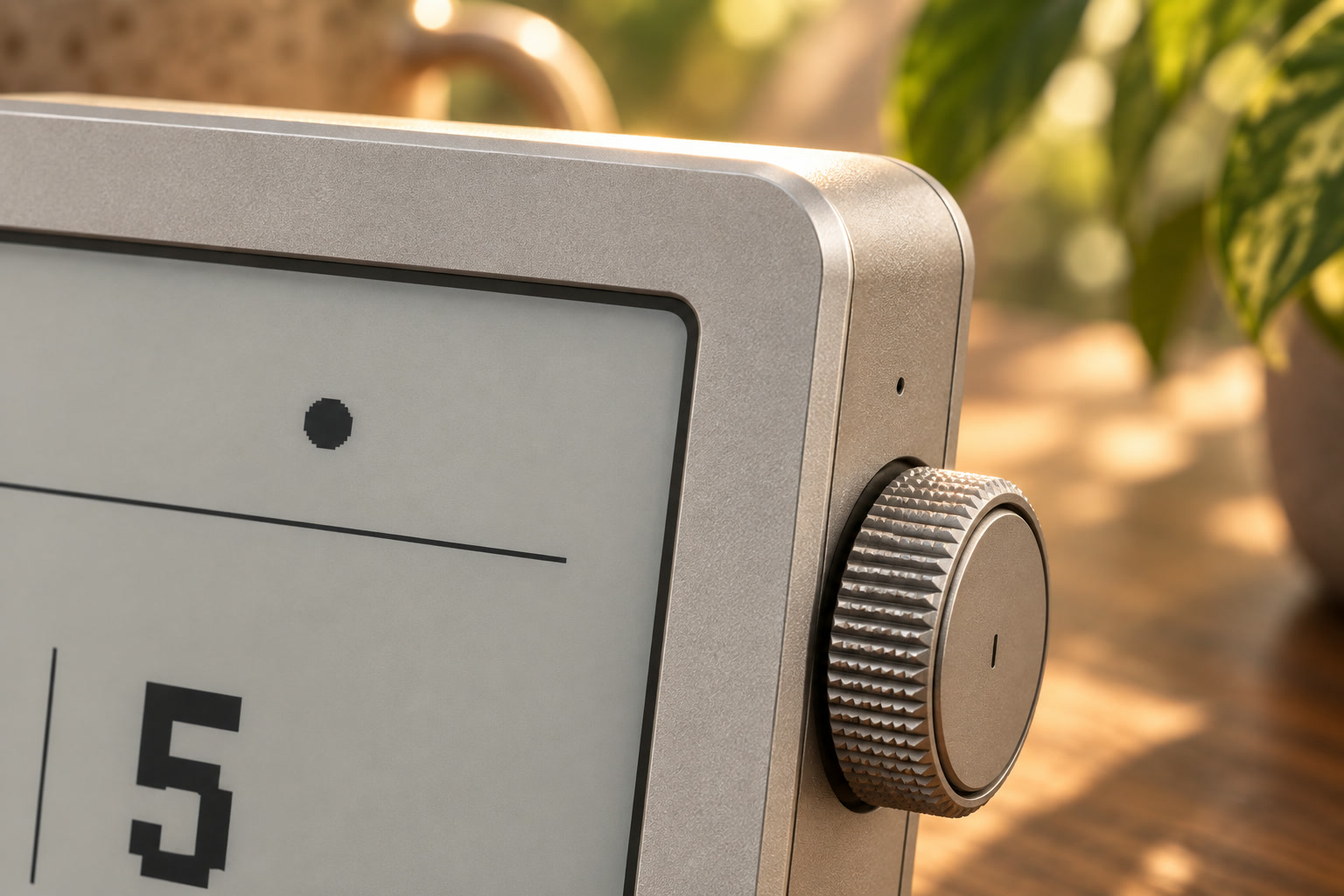
Extreme close-up of Humanloop ph7 showing the fine bead-blasted aluminum grain, edge break, recessed display bezel, enclosure seam, and knurled side dial
Body6061 aluminum
PreparationMicro bead blast
FinishClear Type II anodize
Detail0.4 mm edge break

“It should read as an instrument—something with one job, made properly.

05 / Details that carry it

Most of the product impression happens at five touchpoints.

01

E-paper

Always on, zero-power image hold, no screen glow, high ambient clarity.

02

Precision dial

Machined, knurled, detented, and weighted to make list movement feel exact.

03

Metal controls

Laser-etched legends; bores tolerance-compensated for anodize thickness.

04

Unibody

Fewer visible seams, stronger haptic transmission, and the enclosure as heat sink.

05

Serviceable back

Four deliberate screws, antenna window, wordmark, and room for custom branding.

Humanloop
2 need you
3 running12 done
Humanloop
1 of 2
Nightly build
Question
Turn to moveSelect
Humanloop
Deploy 4471 to production?
Approve
Hold selectConfirm
Humanloop
Listening
Release to send
Mic active00:04

Black or white—never gray.One-bit bitmap type avoids antialiasing artifacts and makes the display feel native to its medium.

Readable before it is beautiful.Large counts and stark hierarchy must scan in peripheral vision from across a desk.

Refresh with restraint.Frequent changes use partial refresh; full clears are reserved for screen changes and ghosting control.

06 / Engineering integration

The premium material creates the program’s highest-risk problem.

A sealed aluminum body shields the Pi Zero 2 W’s PCB antenna. The solution is not a hidden workaround: the polymer RF window becomes a designed feature on the removable back—and must earn its geometry through testing.

Critical experiment / RF window

Prototype the field condition before cutting metal.

Line a resin body with aluminum tape, place the radio behind candidate windows, then vary aperture and metal clearance at realistic desk range.

RSSIbetter than −70 dBm
Packet loss / 1 hrunder 0.1%
Reconnectunattended, under 60 s
Interrupt latency≤3 s p50 / ≤10 s p95
Prototype economics

$683 / unit

At single-unit prototype quantities, the enclosure is approximately $504—74% of unit cost. The $2,000 program budget buys one machined set, so each clearance and control path must be proven in resin first.

Electronics$179
CNC enclosure$504
Finishsingle anodize batch
Prototype scopeone finished unit
Rev A
Fit

Do the measured components, bosses, and internal volumes actually assemble?

Rev B
Feel

Correct button travel, dial clearance, edge breaks, and one-handed reach.

Rev C
RF

Foil-lined body; test window size, position, and antenna clearance.

Rev D
Dry run

Complete assembly with nothing left to learn and no hand-fit exceptions.

Rev E
Machine

6061 unibody, buttons, dial, and back plate cut and anodized together.

07 / Design validation

How the concept is tested.

01
Workflow evidence

Interview and shadow agent-heavy users; establish interruption frequency, response cost, and what deserves hardware.

02
One-handed ergonomics

Test desk angle, reach envelope, dial torque, detent force, button travel, hold duration, and left/right-hand accommodation.

03
Glanceability

Validate the 1-bit hierarchy at 0.5, 1, and 1.5 meters across office lighting and viewing angles.

04
RF + power

Record enclosed RSSI, packet loss, reconnect behavior, full-system power, and battery runtime.

05
Manufacturing readiness

Complete measured CAD, tolerance stack, drawings, DFM, CMF samples, full resin dry run, and final assembly record.

06
Product trial

Live with the device for one week and compare interruptions resolved, time-to-response, false urgency, and behavioral trust against the existing workflow.